
Frequently asked questions
Everything you need to know about KonkiCam, its installation, day-to-day use and your subscription.
Hardware
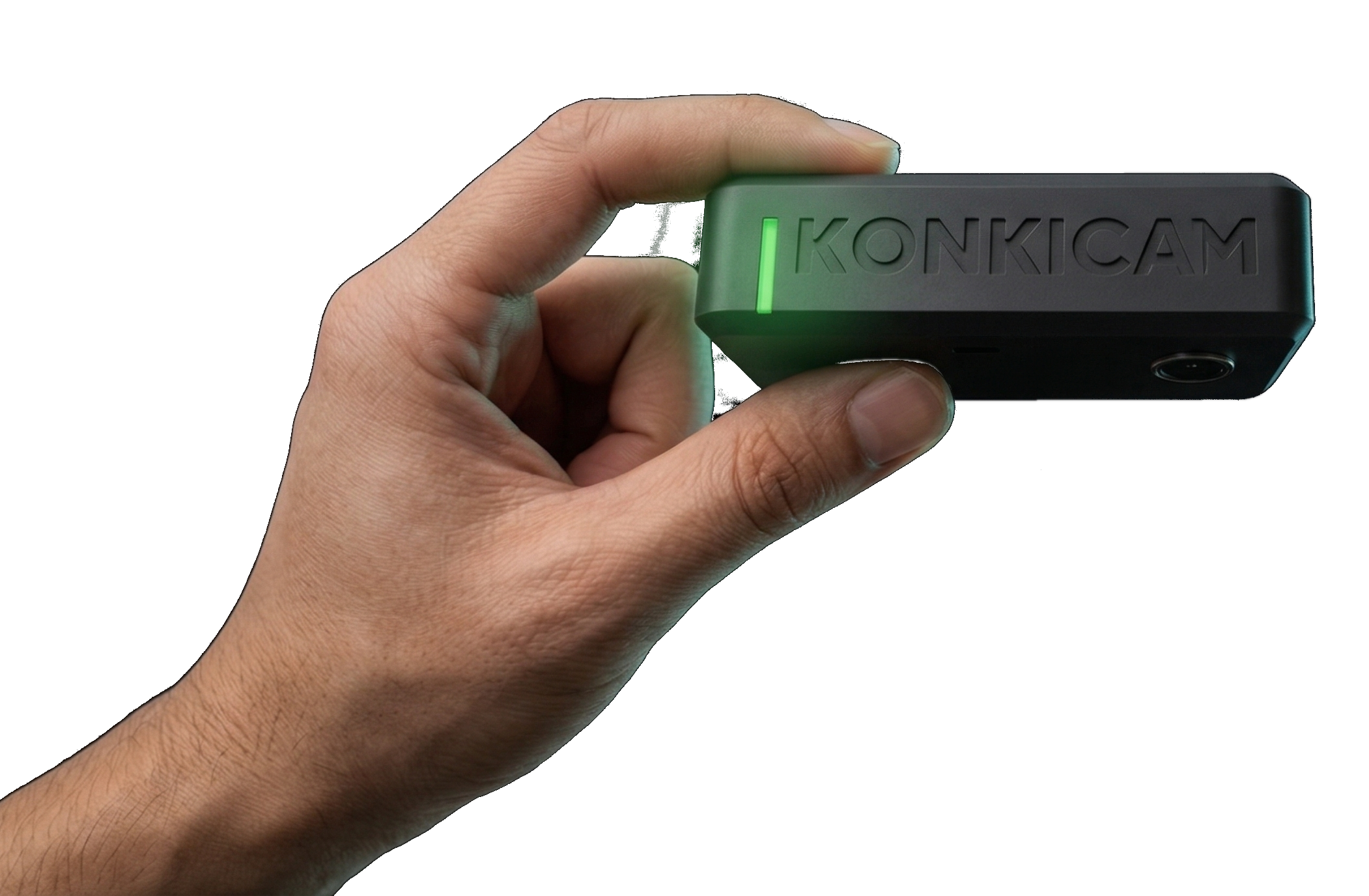
KonkiCam is a smart, compact camera unit that photographs your dishes before dispatch, triggered contact-free by gesture detection (in line with food hygiene standards).
KonkiCam connects (2.4GHz Wi-Fi) to the Konki Labs Cloud for secure transfer and storage of your evidence. A Dashboard lets you find all your orders, their photos and the status of disputes and refunds* in one click.
*subject to the platforms making the data available. See Terms of Use.
KonkiCam measures 9 x 5 x 2.5 cm – the size of a packet of tissues (and smaller than a smartphone), discreet enough to blend into your dispatch area.
In its ultra-compact format, KonkiCam packs in a lot of technology and is patent pending: 12-megapixel sensor, gesture detection, and secure transfer and storage of your photos over 2.4GHz Wi-Fi.
KonkiCam’s software is fully secure: only you and authorised members of your staff can access the data.
Dashboard
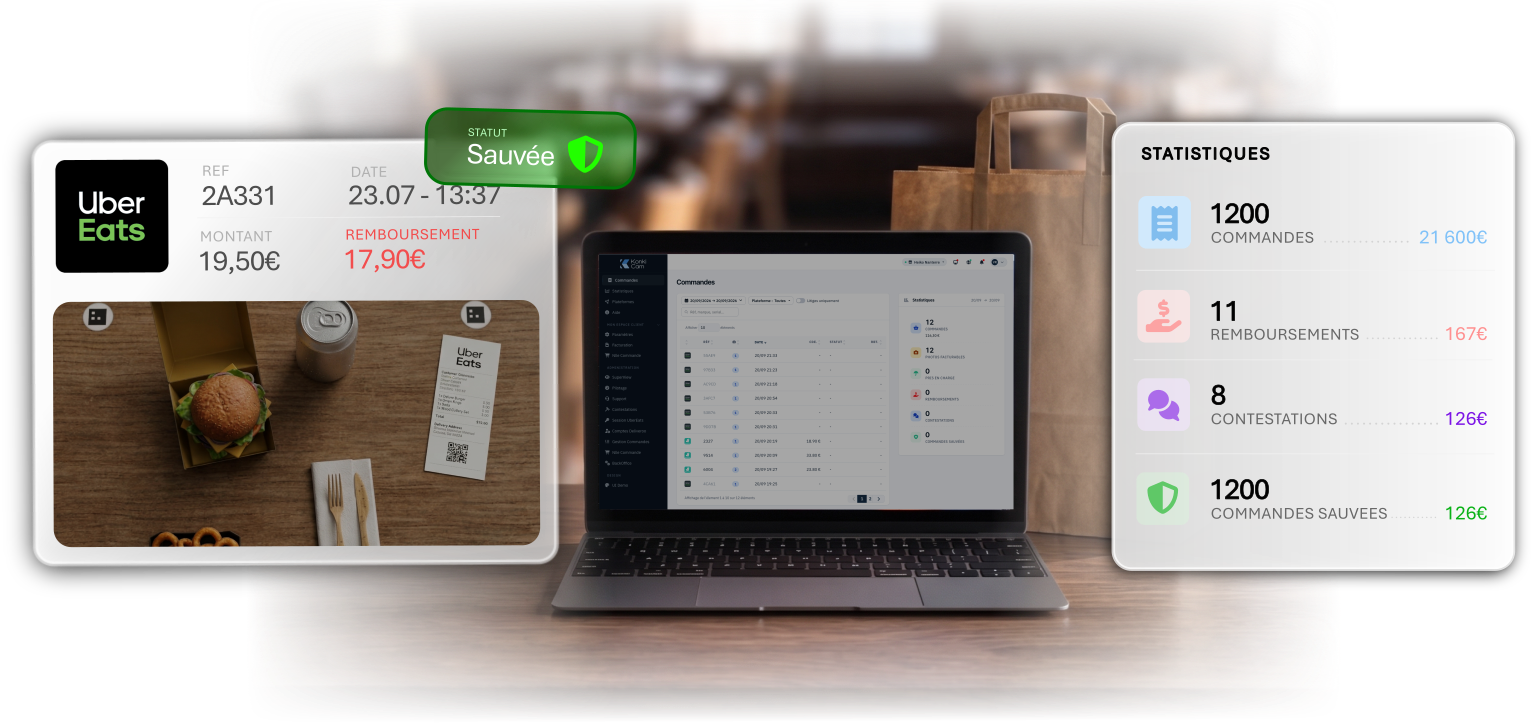
The KonkiCam Dashboard is the control centre for your orders. Users log in with a username and password from any connected device (PC, smartphone, tablet).
The Dashboard includes:
- A list of orders and their photos, sorted by platform, reference, date/time and status*
- Order and refund amounts*
- Direct links to Uber Eats and Deliveroo orders to dispute refunds in 2 clicks*
- Statistics and quality scores (legitimate refunds vs. fraud)
The Dashboard lets you set up several users for the same restaurant, each with the appropriate permissions.
*subject to the platforms making the data available. See Terms of Use.
As the manager of your restaurant, you decide who can access its KonkiCam Dashboard. You create access for your staff according to their responsibilities:
- Service administrator (director, owner): manages the contract and billing
- Follow-up lead (manager): handles disputes
- User (team member): views orders
Using KonkiCam
Capturing your orders with KonkiCam is incredibly simple!
Place the items in the marked capture area, hold your hand a few centimetres under KonkiCam for 1 second, and that’s it! The photo is taken in under 2 seconds and the images are automatically and securely transferred to the KonkiCam Cloud, ready in your Dashboard.
KonkiCam works independently of any POS or kitchen system. Orders are matched by recognising the kitchen ticket, which you then staple to your delivery bags.
Absolutely – you can install as many KonkiCams as you like, for example if you have several dispatch or packing areas.
On the platforms’ portals, you can dispute a refund by providing a photo of the order before dispatch.
With a clear, well-framed photo of the complete order and a clearly visible ticket, you stand every chance of winning your case and being paid the amount refunded to the customer.
A text field lets you explain your claim alongside the KonkiCam photo.
A drop-down list lets you select the reason for your claim alongside the KonkiCam photo.
KonkiCam is a solution for defending against fraud and improving quality. We encourage our customers to use the service ethically and only dispute refunds they believe in good faith to be illegitimate. Disputing legitimate refunds may damage your credibility with the platforms, which could then treat your future claims more strictly.
KonkiCam also lets you use data on incorrect orders to make your teams more accountable and aware of sending accurate orders!
Installation
All you need is an internet connection (2.4GHz Wi-Fi) and a standard mains socket for the 15W power supply (provided with KonkiCam).
Your restaurant also needs to use printed kitchen tickets (order tickets from your POS or the delivery platforms), which KonkiCam needs to identify each order.
The modular mounting system means KonkiCam can be installed in any dispatch-area layout: on a wall, under a shelf, or even on a freestanding base.
If you’re unsure about the installation options in your restaurant, contact us!
KonkiCam installs in minutes! No drilling, no tools: the mounts are self-adhesive (3M) and fix firmly to any smooth surface.
- Switch on your KonkiCam and connect it to your Wi-Fi network (2.4GHz),
- Position KonkiCam above your packing area on its mount,
- Check the framing on any connected screen (PC/tablet/smartphone),
- You’re ready to capture and protect your orders!
Subscription
The KonkiCam subscription gives you access to all KonkiCam services:
- KonkiCam unit on loan
- Secure transfer and storage of your photos on the Konki Labs Cloud
- Automatic order recognition and indexing by AI engine
- KonkiCam Dashboard to find all your photos in one click
- Download of your order photos
- Uber Eats and Deliveroo order sync*
- Detailed order statistics (volumes, amounts, refunds, etc.)*
- Email alerts to track disputes and refunds*
*subject to the platforms making the data available. See Terms of Use.
The KonkiCam subscription is a tiered monthly plan (XS, S, M, L, XL, XXL), applied automatically according to the number of orders captured in the month.
At the start of each month, you are billed according to the number of orders protected in the previous month (see prices in the Terms of Use).
E.g. In January you captured 350 orders with KonkiCam, which corresponds to the “S” plan (101 to 500 orders). On 1 February you will therefore be billed for the KonkiCam “S” plan.
Still have a question?
Our team will answer and help you get your KonkiCam up and running.